
8.1. Grouping Objects: Lists, Aggregation, and Strings
8.1.1. Introduction to Grouping Objects: List
In our programs so far, we have stored individual pieces of data in individual variables or instance fields. For example, if you were building a card game, you might store a player’s starting hand using separate variables:
Card card1 = new Card("Dragon", "Fire", 8);
Card card2 = new Card("Knight", "Steel", 5);
Card card3 = new Card("Cleric", "Light", 4);
Throughout this chapter, we will use a simple domain class modeling a tabletop
playing card. Each card encapsulates a name, an element type, and an
integer power value:
public class Card
{
    private String name;
    private String element;
    private int power;

    public Card(String name, String element, int power)
    {
        this.name = name;
        this.element = element;
        this.power = power;
    }

    public String getName()
    {
        return name;
    }

    public String getElement()
    {
        return element;
    }

    public int getPower()
    {
        return power;
    }

    @Override
    public String toString()
    {
        return name + " [" + element + "] (Power: " + power + ")";
    }
}
While this approach works for small, fixed scenarios, it breaks down quickly as programs grow. What happens when a player draws five more cards? Or what if a player discards three cards and trades two others? You would need dozens of individual variables, and writing code to inspect or display every card would require repetitive, bloated statements. Even worse, you cannot easily change the number of variables while the program is running.
To solve this problem, object-oriented languages provide containers—objects specifically designed to hold and manage collections of other objects. Java provides a comprehensive library known as the Java Collections Framework, which offers three broad categories of containers:
Lists: Ordered sequences of items where each element has a specific position (index).
Sets: Unordered groups of unique items that contain no duplicate elements.
Maps: Lookup tables of key-value pairs (like a dictionary mapping a word to its definition).
In this chapter, we focus on the most versatile and widely used collection: lists.
8.1.1.1. The List Interface and the ArrayList Class
In Java, List is an interface, not a concrete class. An interface specifies
what methods a container must provide, without dictating how those methods are
implemented behind the scenes. By separating the interface from the implementation,
Java allows programmers to write code that depends on the general behavior of a
list, regardless of the underlying data structure used.
Because List is an interface, you cannot create an instance directly using
new List(). Instead, you instantiate a concrete class that implements
the List interface. The most common concrete implementation in Java is
ArrayList:
import java.util.List;
import java.util.ArrayList;

// Declare using the List interface; instantiate using the ArrayList class:
List<Card> hand = new ArrayList<Card>();
Notice that we declare the variable hand using the interface type List<Card>,
but we instantiate it using new ArrayList<Card>(). This is an application of
polymorphism: any valid List implementation can be assigned to a List
reference variable.
8.1.1.2. The Diamond Operator (<>)
In Java 7 and later, you do not need to repeat the type parameter on the right-hand
side when instantiating a collection. Instead, you can write the empty angle brackets
<>, known as the diamond operator:
// Modern, idiomatic Java instantiation:
List<Card> hand = new ArrayList<>();
The Java compiler automatically infers the element type (Card) from the variable’s
declared type on the left. Both new ArrayList<Card>() and new ArrayList<>()
produce identical objects at runtime, but the diamond operator is preferred because
it avoids redundant typing.
8.1.1.3. How ArrayList Works in Memory
An ArrayList organizes its elements in a contiguous, sequential line. Each
element is assigned an integer position called an index.

Just like pixel coordinates in an image or character positions in text, list indexing starts at 0, not 1. In a list containing \(n\) elements:
The first element is always located at index
0.The second element is located at index
1.The last element is located at index \(n - 1\) (that is,
list.size() - 1).
Unlike primitive arrays whose sizes are fixed upon creation, an ArrayList
grows and shrinks dynamically. When you add elements, the ArrayList
automatically allocates more memory if needed. When you remove elements, it
compacts the remaining items to maintain a continuous, zero-indexed sequence.
Take a few minutes to watch the following overview of how List works:
8.1.2. Core List Operations: Add, Remove, Size, Get
The List interface defines a standardized set of methods for managing
elements. The table below summarizes the most essential methods:
Method Signature |
Purpose & Behavior |
|---|---|
|
Appends |
|
Inserts |
|
Returns the element located at |
|
Replaces the element at |
|
Removes and returns the element at |
|
Removes the first occurrence of |
|
Returns the number of elements currently stored in the list. |
|
Returns |
|
Returns |
|
Removes all elements from the list, resetting its size to 0. |
8.1.2.1. Adding and Accessing Elements
When an ArrayList is first created, it is completely empty—its size is 0.
Calling add() appends elements one by one to the end of the list:
List<String> party = new ArrayList<String>();
party.add("Warrior");  // stored at index 0; size is now 1
party.add("Mage");     // stored at index 1; size is now 2
party.add("Rogue");    // stored at index 2; size is now 3
To retrieve an element, pass its zero-based index to get():
String leader = party.get(0);    // returns "Warrior"
String support = party.get(1);   // returns "Mage"
8.1.2.2. Index Boundaries and IndexOutOfBoundsException
Because an ArrayList only contains positions from 0 to size() - 1,
attempting to access an index outside this range causes a runtime crash:
List<String> party = new ArrayList<String>();
party.add("Warrior");
party.add("Mage");

// Valid indices are 0 and 1 (size is 2)
String hero = party.get(2); // FAILS: throws IndexOutOfBoundsException!
Whenever you see an IndexOutOfBoundsException, your code attempted to
access a slot that does not exist. Remember: a list of size 2 has no index 2!
8.1.2.3. Removing Elements and Automatic Shifting
When you remove an element from a list using remove(int index), the ArrayList
automatically shifts every subsequent element one position to the left to close
the gap:
List<String> party = new ArrayList<String>();
party.add("Warrior");  // index 0
party.add("Mage");     // index 1
party.add("Rogue");    // index 2

party.remove(1);       // removes "Mage"
// "Rogue" shifts from index 2 to index 1!
// party.size() is now 2
String secondMember = party.get(1); // returns "Rogue"
8.1.2.4. Writing Unit Tests for List Operations
In CS 1114, we use assertThat() assertions to verify list state in our unit tests. This provides a number of expressive methods for checking collections such as:
Take a few minutes to watch this video demonstration of common list methods:
8.1.3. Generic Type Parameters & Type Safety
In our earlier variable declarations, every type was fixed and self-contained:
int count; or String name;. However, a list is a container that holds
other objects. If Java did not know what kind of objects a list held, you
could accidentally add a Car to a list intended for Cards, leading to
mysterious errors later when trying to cast or invoke methods on those objects.
To solve this, Java uses generics. A generic type is a class or interface
that takes one or more types as parameters. We specify the element type inside
angle brackets (<E>):
List<Card> deck = new ArrayList<Card>();
Here, Card is the type argument. It tells the Java compiler that this
particular list may only contain references to Card objects (or subclasses
of Card).
8.1.3.1. Compile-Time Type Safety
The greatest benefit of generic collections is type safety enforced at compile time. If you attempt to add an incompatible object to a typed list, the compiler immediately rejects the code:
List<Card> deck = new ArrayList<Card>();
deck.add(new Card("Dragon", "Fire", 8)); // OK: is a Card
deck.add("Ace of Spades");                // COMPILER ERROR: String is not a Card!
Because the compiler verifies element types when code is compiled, you never
need to manually type-cast elements when retrieving them with get():
// No cast needed; Java knows deck.get(0) returns a Card
Card topCard = deck.get(0);
int power = topCard.getPower();
8.1.3.2. Primitive Wrapper Classes and Autoboxing
One crucial limitation of Java generics is that type arguments must be reference types (objects), not primitive types. The following line will not compile:
List<int> scores = new ArrayList<int>(); // SYNTAX ERROR: primitive type not allowed!
To store primitives in collections, Java provides an object wrapper class for each primitive type:
Primitive Type |
Wrapper Class |
Example Value |
|---|---|---|
|
|
|
|
|
|
|
|
|
|
|
|
To create a list of integers or doubles, use the corresponding wrapper class:
List<Integer> scores = new ArrayList<Integer>();
List<Double> ratings = new ArrayList<Double>();
Java automatically converts between primitive values and their corresponding wrapper objects through autoboxing (converting a primitive to an object) and unboxing (extracting the primitive value from an object):
List<Integer> scores = new ArrayList<Integer>();
scores.add(95);        // Autoboxing: int 95 automatically converted to Integer

int highScore = scores.get(0); // Unboxing: Integer automatically converted to int
Take a few minutes to watch this video explaining generics in Java:
8.1.4. Encapsulating Collections: Decks and Hands
In object-oriented programming, containers are rarely left exposed as bare,
unprotected variables in client code. Instead, we encapsulate collections inside
domain classes. This design pattern is called aggregation: a domain entity
(such as a CardDeck, a CardHand, or an Inventory) manages an internal
List as a private instance field.
By encapsulating the collection, the owning class controls all additions, removals, and modifications, ensuring that the collection’s state remains valid and consistent.
8.1.4.1. Designing a CardHand Class
Consider modeling a player’s hand in a tabletop game. A hand holds multiple
Card objects, but client code should not manipulate the raw list directly.
Instead, the CardHand class provides controlled domain operations like
addCard(), playCard(), and getCardCount():
import java.util.List;
import java.util.ArrayList;

public class CardHand
{
    private int maxCapacity;
    private List<Card> cards;

    /**
     * Creates an empty card hand with the specified maximum capacity.
     */
    public CardHand(int capacity)
    {
        this.maxCapacity = capacity;
        this.cards = new ArrayList<Card>();
    }

    /**
     * Adds a card to the hand if there is space available.
     * Returns true if added, false if the hand is full.
     */
    public boolean addCard(Card card)
    {
        if (card != null && this.cards.size() < this.maxCapacity)
        {
            this.cards.add(card);
            return true;
        }
        return false;
    }

    /**
     * Plays (removes and returns) the card at the specified index.
     */
    public Card playCard(int index)
    {
        if (index >= 0 && index < this.cards.size())
        {
            return this.cards.remove(index);
        }
        return null;
    }

    /**
     * Returns the number of cards currently in this hand.
     */
    public int getCardCount()
    {
        return this.cards.size();
    }
}
8.1.4.2. Defensive Copying vs. Exposing Internal References
Suppose a client needs to inspect all the cards currently held in a CardHand.
A common beginner instinct is to write a getter like this:
// DANGEROUS: Leaks the internal collection reference!
public List<Card> getCards()
{
    return this.cards;
}
Why is this dangerous?
Remember that object variables store references (memory addresses). If
getCards() returns this.cards, external client code obtains a direct
reference to the internal list. A client could then execute:
CardHand hand = new CardHand(5);
hand.addCard(new Card("Dragon", "Fire", 8));

// Rogue external code clears the player's hand directly!
List<Card> leaked = hand.getCards();
leaked.clear(); // Empties the hand behind its back!
This completely violates encapsulation. The CardHand can no longer
guarantee its invariants (such as capacity limits) because an outsider modified
its private list directly.
To prevent this, apply defensive copying. When returning an encapsulated collection, create and return a brand-new list containing copies of the references:
/**
 * Returns a safe, defensive copy of the cards in this hand.
 */
public List<Card> getCards()
{
    return new ArrayList<Card>(this.cards);
}
Now, if a client calls getCards().clear(), they only clear their own copy.
The private cards field inside CardHand remains completely protected.
8.1.5. Iterating Lists with Enhanced For-Each Loops
Once a collection holds objects, we frequently need to examine every element: searching for a specific card, counting elements that match a criterion, or calculating a total score.
While you could iterate over a list using a while loop with an index counter
(such as int i = 0; while (i < list.size()) { ... i++; }), Java provides a
cleaner, more readable loop syntax specifically designed for collections: the
enhanced for-each loop.
8.1.5.1. Enhanced For-Each Syntax
The general syntax of an enhanced for-each loop is:
for (ElementType variableName : collectionName)
{
    // Statements executed for each element in the collection
}
In each iteration, Java automatically retrieves the next element from the collection, assigns it to the loop variable, and executes the loop body. For example, to inspect every card in a player’s hand:
for (Card card : this.cards)
{
    System.out.println("Inspecting: " + card.getName());
}
8.1.5.2. The Search Idiom and Early Loop Exit
A classic operation is searching a collection to find the first element that satisfies a condition. When you find the desired object, there is no need to keep looping through the rest of the list. Instead, use an early loop exit by returning the object immediately:
/**
 * Finds and returns the first card in the hand matching the given name.
 * Returns null if no matching card exists.
 */
public Card findCardByName(String name)
{
    for (Card card : this.cards)
    {
        if (card.getName().equals(name))
        {
            return card; // Immediate early exit! Found it!
        }
    }
    return null; // Checked the whole hand; card is not present
}
Notice how this works:
The loop examines each card one by one.
If
card.getName().equals(name)istrue, thereturn card;statement terminates both the loop and the entire method immediately.If the loop finishes inspecting all cards without executing the
returninside the loop, execution drops down toreturn null;, signaling that no matching card was found.
8.1.5.3. The Accumulator Idiom: Counting and Summing
Another essential pattern is the accumulator. An accumulator is a variable declared before the loop, initialized to zero (or an empty collection), and updated incrementally on each iteration.
For example, to calculate the total attack power of all cards in a hand:
/**
 * Calculates the total attack power of all cards in this hand.
 */
public int getTotalPower()
{
    int totalPower = 0; // The numeric accumulator
    for (Card card : this.cards)
    {
        totalPower = totalPower + card.getPower();
    }
    return totalPower;
}
8.1.5.4. Filtering Elements into a New Collection
An accumulator does not have to be a number—it can also be a new list! Suppose you want to retrieve all cards belonging to a specific element type (e.g., “Fire”):
/**
 * Returns a list of all cards in this hand of the specified element type.
 */
public List<Card> getCardsByElement(String element)
{
    List<Card> matches = new ArrayList<Card>(); // The collection accumulator
    for (Card card : this.cards)
    {
        if (card.getElement().equals(element))
        {
            matches.add(card); // Accumulate matching cards
        }
    }
    return matches;
}
8.1.6. Generating and Testing Random Behaviors
In games, simulations, and interactive software, programs often need to introduce chance or unpredictability—such as shuffling a deck, dealing a random card, or selecting a random encounter.
8.1.6.1. Generating Random Numbers with student.util.Random
Java provides a standard random number generator, and Virginia Tech’s student
library provides a special version: student.util.Random. To use it, add the
import statement at the top of your class:
import student.util.Random;
The Random class provides a static method called Random.generator() to obtain a
generator instance. You can then invoke nextInt(limit) to produce a random
integer:
Random generator = Random.generator();
int value = generator.nextInt(4); // Generates a random number from 0 through 3
The generator.nextInt(limit) method takes an upper limit and returns a random
integer from 0 (inclusive) up to (but not including) limit. For example,
generator.nextInt(100) produces 100 possible values from 0 to 99.
8.1.6.2. Drawing a Random Card from an Aggregated Collection
Because an ArrayList uses zero-based indexing from 0 to size() - 1,
passing this.cards.size() to nextInt() generates a random index matching
a valid position in the list:
public class CardHand
{
    private List<Card> cards;
    private Random generator;

    public CardHand(int capacity)
    {
        this.cards = new ArrayList<>();
        this.generator = Random.generator();
    }

    /**
     * Draws and removes a random card from this hand.
     * Returns null if the hand is empty.
     */
    public Card drawRandomCard()
    {
        if (this.cards.isEmpty())
        {
            return null;
        }
        int randomIndex = this.generator.nextInt(this.cards.size());
        return this.cards.remove(randomIndex);
    }
}
8.1.6.3. Deterministic Testing with Random.setNextInts()
Random behaviors make games exciting, but they make automated software testing difficult. If your code draws a random card, how can an automated test assert what was drawn? If a test passes on one run and fails on another because different cards were chosen, the test is flaky and unreliable.
The student.util.Random class solves this problem through deterministic testing.
In a unit test, you can call Random.setNextInts(…) to predetermine the exact
sequence of integers the generator will produce:
public void testDrawRandomCardDeterministic()
{
    CardHand hand = new CardHand(5);
    hand.addCard(new Card("Dragon", "Fire", 8));  // index 0
    hand.addCard(new Card("Knight", "Steel", 5)); // index 1
    hand.addCard(new Card("Cleric", "Light", 4)); // index 2

    // In your unit test, force the generator to return index 1 next:
    Random.setNextInts(1);

    Card drawn = hand.drawRandomCard();

    // Assert with 100% confidence: index 1 was the Knight!
    assertThat(drawn.getName()).isEqualTo("Knight");
    assertThat(hand.getCardCount()).isEqualTo(2);
}
When Random.setNextInts(...) is called, the generator enters replay mode and
delivers the specified integers in order. Once those values have been consumed, it
reverts to normal pseudorandom generation. This technique gives you the best of both
worlds: realistic random choices in production code, and 100% reproducible results in
automated test suites.
8.1.7. The null Keyword & Diagnosing NullPointerExceptions
When you declare an object variable or reference field in Java, it stores a reference (a pointer) to an object in memory. But what if a variable has not been assigned to any object yet? Or what if a search method looks for an item and finds nothing?
Java provides the special keyword null to represent the absence of an object:
Card emptyCard = null; // Refers to no object
8.1.7.1. Reference Semantics of null
Understanding null is essential when working with collections:
Uninitialized Fields Default to null: When an object is instantiated, all its reference fields automatically start with the value
nullunless explicitly initialized in their declaration or constructor.Search Sentinels: As demonstrated in our
findCardByName()method above, returningnullis the standard idiom in Java to signal that an object was not found.
8.1.7.2. Causes of NullPointerException: The Receiver Dot Rule
A variable holding null does not refer to any object. Therefore, you cannot
call methods or access fields through a null reference.
Whenever Java evaluates an expression with a dot (.), the expression to the
left of the dot is called the receiver. If the receiver evaluates to null,
the Java Virtual Machine immediately throws a NullPointerException (frequently
abbreviated as NPE):
Card card = null;
int power = card.getPower(); // CRASH: card is null! Throws NullPointerException!
In CS 1114, the two most common causes of NullPointerExceptions are:
Forgetting to initialize a collection field in a constructor:
public class CardHand
{
    private List<Card> cards; // Defaults to null!

    public CardHand(int capacity)
    {
        // BUG: Forgot: this.cards = new ArrayList<Card>();
    }

    public void addCard(Card card)
    {
        this.cards.add(card); // CRASH: this.cards is null! Throws NPE!
    }
}
Failing to check the result of a search method that may return null:
Card found = hand.findCardByName("Phoenix");
// If "Phoenix" is not in the hand, found is null!
System.out.println(found.getPower()); // CRASH if found is null!
8.1.7.3. Defensive Null Checks
To avoid NullPointerExceptions, write defensive null checks using != null
before invoking methods on references that might be empty:
Card found = hand.findCardByName("Phoenix");
if (found != null)
{
    System.out.println("Power: " + found.getPower());
}
else
{
    System.out.println("Phoenix is not currently in the hand.");
}
8.1.7.4. Diagnosing an NPE with BlueJ Stack Traces
When an exception occurs during test execution in BlueJ, the test turns red and displays a failure message:
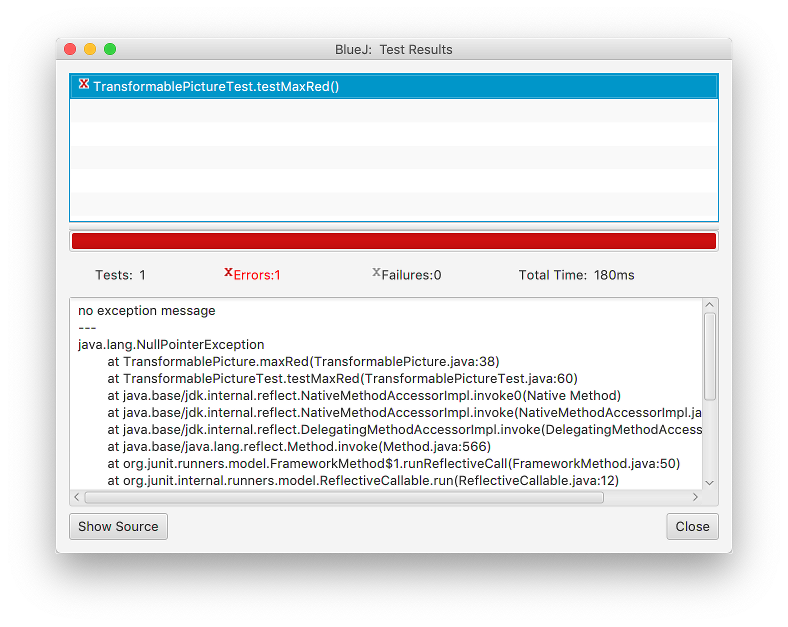
If you click on the failed test in BlueJ, the lower pane displays the stack trace. A stack trace is a chronological record of the method calls that were active at the moment the program crashed.
To diagnose a NullPointerException from a stack trace:
Locate the topmost line in the stack trace that belongs to your own code (look for your class name and file name in parentheses, such as
CardHand.java:38).Open your source code to that exact line number.
Inspect every dot (
.) on that line. One of the expressions directly to the left of a dot wasnullwhen the line executed.Trace backwards to determine why that variable was
null: was an instance field never initialized withnew? Did a method call returnnull? Was a parameter passed asnull?
8.1.7.5. Using BlueJ’s Debugger & Code Pad
BlueJ provides interactive tools to help you inspect variables and step through code line by line to pinpoint null references:
You can also use BlueJ’s Code Pad to interactively evaluate Java expressions, instantiate lists, and inspect values:
8.1.8. String Manipulation & Immutability
Just as a list groups objects in a sequential order, a String groups individual
characters in a sequential order. Characters in Java belong to the primitive type
char, written inside single quotes ('A', '5', '!'), while strings
are objects belonging to the String class, written inside double quotes
("Shadow Dragon").
8.1.8.1. String Immutability
The single most important conceptual rule regarding strings in Java is: Strings are immutable.
Once a String object is created in memory, its contents can never be changed.
Methods in the String class that appear to modify text (like toUpperCase(),
replace(), or substring()) do not change the original string. Instead,
they construct and return a brand new String object containing the modified
result:
String name = "shadow dragon";
name.toUpperCase(); // Creates a new uppercase string, but throws it away!

System.out.println(name); // Still prints lowercase "shadow dragon"!

// Correct usage: reassign the variable to reference the new string:
name = name.toUpperCase();
System.out.println(name); // Prints "SHADOW DRAGON"
8.1.8.2. Essential String Methods
The table below summarizes the core methods available on every String object:
Method Signature |
Purpose & Behavior |
|---|---|
|
Returns the number of characters in the string. (Notice the parentheses: unlike array |
|
Returns the character at the specified 0-based index. |
|
Returns a new string containing the characters from |
|
Returns a new string containing characters from |
|
Returns the 0-based index of the first occurrence of |
|
Compares the character contents of two strings for equality. Returns |
|
Compares two strings ignoring case distinctions (e.g., |
8.1.8.3. Slicing Strings with substring()
The two-parameter version of substring(beginIndex, endIndex) uses a half-open
interval \([\text{beginIndex}, \text{endIndex})\). The character at beginIndex
is included, but the character at endIndex is excluded:
String title = "DragonKnight";
// Indices:     012345678901

String firstWord = title.substring(0, 6);  // "Dragon" (indices 0 through 5)
String secondWord = title.substring(6);    // "Knight" (indices 6 to the end)

int len = firstWord.length();              // 6
char initial = title.charAt(0);            // 'D'
8.1.8.4. String Equality: equals() vs. ==
Never compare strings using the == relational operator. In Java:
==tests reference equality (whether two variables point to the exact same memory address)..equals()tests content equality (whether two strings contain the exact same sequence of characters).
String str1 = new String("Fire");
String str2 = new String("Fire");

boolean sameRef = (str1 == str2);         // false! They are different objects in memory!
boolean sameText = str1.equals(str2);     // true! Both contain "F-i-r-e"
8.1.8.5. Writing Unit Tests for String Operations
The assertThat() method provides built-in assertions for testing string operations:
public void testCardNameFormatting()
{
    String cardName = "Shadow Dragon";

    assertThat(cardName).hasSize(13);
    assertThat(cardName.length()).isEqualTo(13);
    assertThat(cardName.charAt(0)).isEqualTo('S');
    assertThat(cardName.substring(0, 6)).isEqualTo("Shadow");
    assertThat(cardName.substring(7)).isEqualTo("Dragon");
    assertThat(cardName).startsWith("Shadow");
    assertThat(cardName).endsWith("Dragon");
    assertThat(cardName).containsIgnoringCase("dragon");
}
8.1.9. Custom toString Formatting for Entities
Every class in Java automatically inherits from Java’s ultimate root class:
java.lang.Object. The Object class provides a default implementation of
the method:
public String toString()
The purpose of toString() is to return a human-readable text representation
of an object. However, the default implementation inherited from Object simply
prints the class name followed by the object’s internal hash code:
Card card = new Card("Dragon", "Fire", 8);
System.out.println(card); // Prints: Card@4a5729 (Not very useful!)
8.1.9.1. Overriding toString()
Recall the Card class introduced earlier. In that class, we overrode the
default toString() method to return a formatted summary of the card’s state:
@Override
public String toString()
{
    return this.name + " [" + this.element + "] (Power: " + this.power + ")";
}
Now, printing the card produces clear, readable output:
Card card = new Card("Dragon", "Fire", 8);
System.out.println(card); // Prints: Dragon [Fire] (Power: 8)
8.1.9.2. Automatic toString() Invocation
In Java, toString() is called automatically in two major situations:
Printing: Whenever you pass an object to
System.out.println(obj)orSystem.out.print(obj).String Concatenation: Whenever you use the
+operator with aStringand an object (e.g.,"Played: " + card).
8.1.9.3. Formatting Encapsulated Collections in toString()
When an aggregating class (like CardHand) overrides toString(), it can
iterate through its internal collection to build a composite description:
public class CardHand
{
    private List<Card> cards;

    // Other methods omitted...

    @Override
    public String toString()
    {
        if (this.cards.isEmpty())
        {
            return "Hand: (empty)";
        }

        String result = "Hand (" + this.cards.size() + " cards):\n";
        int number = 1;
        for (Card card : this.cards)
        {
            result = result + "  " + number + ". " + card.toString() + "\n";
            number++;
        }
        return result;
    }
}
8.1.9.4. Testing toString()
In your unit tests, verify that toString() formats output according to specification:
public void testCardToString()
{
    Card card = new Card("Knight", "Steel", 5);
    assertThat(card.toString()).isEqualTo("Knight [Steel] (Power: 5)");
}