0.10. Fixed-Size 1D Arrays and Array Idioms
So far, we have used List objects (specifically ArrayList) whenever we
needed to store and manage multiple pieces of data in a single container. Lists
provide powerful capabilities, including dynamic resizing and convenient helper
methods. However, they are not the only container mechanism in Java, nor are they
the most fundamental.
In this chapter, we will study Java’s foundational container structure: the
array. An array is a named collection of contiguous storage locations in
computer memory that hold elements of the same data type. Unlike an ArrayList,
an array has a fixed size established at the moment of creation that can never
grow or shrink.
Arrays are primitive, low-level building blocks. In fact, classes like ArrayList
use an array internally to store their data elements! Understanding how arrays work
is essential for every computer scientist: they offer superior execution performance,
store primitive types directly without wrapper overhead, and form the basis for
multi-dimensional grids and matrix algorithms.

0.10.1. Introduction to Fixed-Size 1D Arrays
An array is a sequence of values; the values stored within the array are called
its elements. An array can store elements of any single type—such as int,
double, boolean, String, or custom objects like Pixel or Card.
However, all elements within a given array must share the same type, known as the
array’s element type.
To use an array, you declare a reference variable of an array type and then instantiate
the array object using the new operator. In Java, array types are denoted by
placing square brackets ([]) after the element type:
int[] counts = new int[4];
double[] values = new double[size];
Notice that Java has no special “array” keyword. Instead, appending [] to any type
turns it into an array type. In the example above:
int[] countsdeclares a variable namedcountswhose type is “array of integers”.new int[4]instantiates a brand new array object in memory with exactly 4 integer slots.The assignment operator (
=) stores the reference to that array incounts.
When allocating an array, the size expression inside the brackets must evaluate to a
non-negative integer. If you attempt to allocate an array with a negative size (e.g.,
new int[-3]), Java will throw a NegativeArraySizeException. Allocating an
array of size zero is permitted and produces an “empty array” (often used to represent
the absence of data without using null).
Note
Fixed Capacity: Once an array object is instantiated, its size is immutable. If your program subsequently needs to hold more (or fewer) items, you must allocate a completely new array object and copy the existing elements over.
0.10.2. Array Bounds, Indexing, and Default Values
Each individual storage slot in an array is identified by a numeric position called
its index (or subscript). Java arrays use zero-based indexing, exactly like
positions in a List or characters in a String:
The first element is located at index
0(the “zeroth” element).The second element is at index
1.The final element is located at index
array.length - 1.
To read or write an individual element, specify the array name followed by the index enclosed in square brackets:
int[] counts = new int[4];
When an array is allocated with new, Java automatically initializes every element
to a predictable default value based on the element type:
Numeric types (
int,long,short,byte): initialized to0Floating-point types (
double,float): initialized to0.0Boolean types (
boolean): initialized tofalseReference types (
String, objects): initialized tonull
The following memory diagram illustrates the state of counts immediately after
instantiation:

The variable counts holds a reference (indicated by the arrow) to the array
object in memory. Inside the array, the bold numbers represent the initial element
values (all 0), while the numbers above indicate the valid index positions (0 through 3).
Every array has a special, built-in constant field named length that stores the
number of elements in the array:
System.out.println("The array has " + counts.length + " slots."); // prints 4
Important
The length Field Has No Parentheses:
For arrays,
lengthis a read-only field:counts.lengthFor strings,
length()is a method:str.length()For lists,
size()is a method:list.size()
Because length is a constant field, you cannot assign a new value to it
(e.g., counts.length = 10; will not compile).
You can use the index operator [] anywhere a regular variable is permitted—in
expressions, assignments, or method arguments:
counts[0] = 7;
counts[1] = counts[0] * 2; // counts[1] becomes 14
counts[2]++;               // counts[2] becomes 1
counts[3] -= 60;           // counts[3] becomes -60
After executing these statements, the array’s contents in memory become:

If you attempt to access an index that is negative, or greater than or equal to
length (such as counts[4] or counts[-1]), Java immediately throws an
ArrayIndexOutOfBoundsException and halts execution.
0.10.3. Arrays Compared to Lists (ArrayList)
Because you have already worked with List and ArrayList in Chapter 8,
comparing arrays directly with lists highlights their key differences:
Feature |
Fixed-Size 1D Array ( |
Generic List ( |
|---|---|---|
Capacity |
Fixed at instantiation (cannot resize) |
Dynamic (grows and shrinks automatically) |
Primitive Storage |
Stores primitive types directly (high efficiency) |
Requires boxed wrapper classes (e.g., |
Element Access |
Subscript syntax: |
Accessor method: |
Element Mutation |
Subscript assignment: |
Mutator method: |
Size Query |
Constant field: |
Method call: |
Method Richness |
No instance methods; uses |
Rich instance methods ( |
When should you choose an array over an ArrayList?
Use an array when the number of elements is fixed or known in advance (such as 24 hours in a day, 7 days in a week, or 60 minutes in an hour), when maximizing execution speed and memory efficiency is paramount, or when building multi-dimensional grid boards.
Use an ArrayList when the collection needs to grow or shrink dynamically as elements are added or removed, or when you need built-in search and reordering methods.
0.10.4. Initializing, Printing, and Naming Arrays
When you know the initial values of your array elements in advance, Java provides a convenient shorthand known as an array initializer literal:
String[] coffees = {"Espresso", "Mocha", "Decaf", "Americano"};
int[] primes = {2, 3, 5, 7, 11, 13};
This single statement accomplishes three tasks simultaneously:
Allocates an array whose length matches the number of comma-separated items inside the braces.
Initializes each slot in sequence with the specified values.
Assigns the reference to the variable.
Initializer literals are ideal for small, known sequences. For larger arrays, you will
typically allocate the array with new and use a loop to initialize the contents:
int[] numbers = new int[100];
for (int i = 0; i < numbers.length; i++)
{
    numbers[i] = i * 2; // sets slots to 0, 2, 4, 6, ..., 198
}
0.10.4.1. Printing Arrays
If you attempt to print an array directly using System.out.println():
int[] values = {1, 2, 3, 4};
System.out.println(values);
The console output will display something cryptic:
[I@bf3f7e0
In Java, [I indicates an array of ints, followed by @ and the hexadecimal
hash code of the object in memory. Arrays do not override toString() from Object!
To display the elements of an array, use the utility method Arrays.toString()
provided by the java.util.Arrays library:
import java.util.Arrays;

// ...
System.out.println(Arrays.toString(values)); // prints: [1, 2, 3, 4]
0.10.4.2. Naming Array Variables
Because an array represents a collection of items, standard Java naming conventions dictate using plural nouns for array variables:
double[] scores = new double[10];
String[] studentNames = new String[25];
Card[] deck = new Card[52]; // or collective singular noun
A plural name clarifies that the identifier refers to the entire collection, which
reads naturally in loops (e.g., for (double score : scores)). Use a singular name
only when the array represents a single logical domain entity where you refer almost
exclusively to indexed properties (e.g., grid[row][col]).
0.10.5. Array Reference Semantics, Aliasing, and Copying
Array variables in Java are reference variables. When you assign one array variable to another, Java copies only the memory reference—it does not create a new array:
double[] a = new double[3];
a[0] = 10.0;
double[] b = a; // b and a now refer to the EXACT SAME array!
This creates an alias: a and b are two names for the same underlying array
in memory:
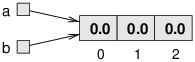
Any modification made through b is immediately visible through a:
b[0] = 42.0;
System.out.println(a[0]); // prints 42.0!
If your goal is to create an independent duplicate of an array, you must allocate a new array of identical length and copy each element individually:
double[] copy = new double[a.length];
for (int i = 0; i < a.length; i++)
{
    copy[i] = a[i];
}
Alternatively, the Java standard library provides Arrays.copyOf() in java.util.Arrays
to perform this operation in a single call:
double[] copy = Arrays.copyOf(a, a.length);
After creating a genuine copy, the memory diagram reflects two distinct objects:
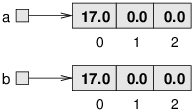
Modifying copy[0] now has no effect on a[0].
0.10.6. Iterating Over Arrays: Numeric For vs. For-Each Loops
To process all elements in an array, Java offers two primary loop constructs: the
counter-controlled numeric for loop and the enhanced for-each loop.
0.10.6.1. Counter-Controlled Numeric For Loop
A counter-controlled for loop uses an integer index variable (traditionally i)
ranging from 0 up to array.length - 1:
int[] values = {10, 20, 30, 40};

for (int i = 0; i < values.length; i++)
{
    values[i] = values[i] * 2; // doubles each element in place
}
Use a numeric for loop whenever:
You need to modify the array elements in place (e.g., transforming values).
You need access to the index position (e.g., searching for the location of an item).
You need to traverse in reverse, step by increments other than 1, or compare adjacent elements (e.g.,
values[i]vs.values[i + 1]).
0.10.6.2. Enhanced For-Each Loop
When you only need to inspect or read each element from beginning to end, the enhanced
for-each loop provides clean, concise syntax without index management:
String[] coffees = {"Espresso", "Mocha", "Decaf", "Americano"};

for (String coffee : coffees)
{
    System.out.println(coffee);
}
Warning
For-Each Cannot Modify Array Slots: In a for-each loop, the loop variable
(coffee above) is a local variable holding a copy of the current element’s
value. Assigning to coffee = "Latte"; inside the loop only updates the local
variable—it has zero effect on the array itself!
0.10.7. Array Index Arithmetic: Circular Wrap-Around & The Modulo Operator
In Chapter 4, you briefly encountered Java’s remainder operator (%), also
known as the modulo operator, for testing whether an integer is even
(number % 2 == 0). When working with arrays, the modulo operator becomes
one of your most powerful algorithmic tools for index arithmetic.
The expression a % b computes the integer remainder left over when a is
divided by b. For any positive integer b and non-negative integer a,
the result of a % b is guaranteed to fall strictly within the range:
Notice that for an array of size N (where valid indices are 0 through
N - 1), computing index % array.length guarantees that the resulting
value is always a valid index within the bounds of the array!
This mathematical property gives rise to several essential array programming patterns:
0.10.7.1. 1. Circular Index Wrap-Around (Ring Buffers & Game Turns)
Suppose you are implementing a turn-based tabletop game with 4 players stored in an array:
Player[] players = new Player[4]; // indices 0, 1, 2, 3
int currentPlayerIndex = 0;
When player 0 finishes their turn, the next player is at index 1. When player
1 finishes, player 2 goes next, followed by player 3. But who goes after player 3?
The turn must wrap around back to player 0!
Without the modulo operator, you would need an if statement every time:
// Clunky approach with an if statement:
currentPlayerIndex++;
if (currentPlayerIndex == players.length)
{
    currentPlayerIndex = 0;
}
With the modulo operator, you can advance to the next player and wrap around in a single, elegant line of code:
// Elegant circular wrap-around:
currentPlayerIndex = (currentPlayerIndex + 1) % players.length;
When currentPlayerIndex is 2, (2 + 1) % 4 evaluates to 3. When
currentPlayerIndex is 3 (the end of the array), (3 + 1) % 4 evaluates to
4 % 4, which is 0—smoothly cycling back to the start!
This circular pattern is universal in computer science: it is used for circular
queues, carousel photo galleries, Tetris piece rotation states (cycling through
4 rotation orientations: (orientation + 1) % 4), and round-robin scheduling.
0.10.7.2. 2. Cyclic Domain Mapping (Clock & Calendar Arithmetic)
The modulo operator allows us to map unbounded or elapsed numeric measurements into fixed array bins. For example, if an elapsed simulation time in hours is given as 53 hours, what hour of the day does that correspond to?
int elapsedHours = 53;
int hourOfDay = elapsedHours % 24; // evaluates to 5 (5:00 AM)
Similarly, in calendar applications where Sunday is day 0 and Saturday is day 6,
any day offset can be mapped to its day of the week using dayOffset % 7.
As you will see in the next section, this direct mathematical mapping enables
arrays to act as high-speed frequency histograms.
0.10.7.3. 3. Periodic Formatting & Actions in Loops
When iterating through a large array, you often need to perform a special action every \(k\) elements—for example, inserting a newline after every 10 values when printing a grid, or alternating background shading on alternating rows:
public void printFormatted(int[] data)
{
    for (int i = 0; i < data.length; i++)
    {
        System.out.print(data[i] + "\t");

        // Print a newline every 5 elements:
        if ((i + 1) % 5 == 0)
        {
            System.out.println();
        }
    }
}
Because (i + 1) % 5 is zero precisely when i + 1 is 5, 10, 15, …, the
loop automatically breaks the output into neat rows of 5 columns.
0.10.7.4. 4. 2D Coordinate Flattening Preview
Finally, the combination of integer division (/) and modulo (%) forms the
bridge to multi-dimensional arrays (Chapter 10). If a 2D grid with COLS
columns is flattened into a 1D array of size ROWS * COLS, any 1D index can be
converted back to its grid coordinates using:
int row = index / COLS; // integer division gives row coordinate
int col = index % COLS; // modulo gives column coordinate
0.10.8. Accumulator Idioms: Summing, Averaging, and Counting
An accumulator is a programming pattern where a variable accumulates an answer incrementally across loop iterations. Three fundamental accumulator patterns appear constantly in array processing:
0.10.8.1. 1. Summing Elements (Running Total)
To compute the sum of an array, initialize a running accumulator to zero and add each element during traversal:
public int sum(int[] numbers)
{
    int total = 0;
    for (int n : numbers)
    {
        total += n;
    }
    return total;
}
0.10.8.2. 2. Calculating an Average
To compute an average, divide the accumulated sum by the array length. Be sure to
cast to double to prevent integer division truncation, and handle empty arrays
defensively:
public double average(int[] numbers)
{
    if (numbers.length == 0)
    {
        return 0.0;
    }
    return (double) sum(numbers) / numbers.length;
}
0.10.8.3. 3. Filtered Counting
To count elements satisfying a specific condition, initialize a counter to zero and increment it only when an element passes a conditional test:
public int countPassingScores(double[] scores, double passingGrade)
{
    int count = 0;
    for (double score : scores)
    {
        if (score >= passingGrade)
        {
            count++;
        }
    }
    return count;
}
0.10.9. Frequency Histograms & Array Buckets
A particularly elegant application of arrays is the frequency histogram (or bucket tallying). In many domains, data attributes fall into a small, discrete range of integers:
Hours in a day: integers
0through23(size 24)Days in a week: integers
0through6(size 7)Test scores: integers
0through100(size 101)
Instead of searching through a list of records every time we want to know how many events occurred at a particular hour, we can use the domain attribute directly as an array index!
Consider a Post class modeling social media messages, where getHour() returns
an integer from 0 to 23. We can track the message frequency for all 24 hours of the day
using a 24-element integer array:
public class PostMonitor
{
    private int postCount;
    private int[] hourCounts;
    private int[] dayCounts;

    public PostMonitor()
    {
        this.postCount = 0;
        this.hourCounts = new int[24]; // 24 slots, all initialized to 0
        this.dayCounts = new int[7];   // 7 slots, all initialized to 0
    }

    public void recordPost(Post post)
    {
        postCount++;

        // Use the post's hour directly as the array index!
        int hour = post.getHour();
        hourCounts[hour]++;

        // Use the post's day of week directly as the index!
        int day = post.getDay();
        dayCounts[day]++;
    }

    public int getHourCount(int hour)
    {
        return hourCounts[hour];
    }
}
Tip
Why Direct Indexing Matters: Direct index mapping executes in constant $O(1)$ time. There is no need to write a search loop or compare values against every past post. The hour itself dictates the exact memory location to increment! This pattern directly scaffolds Lab 09 (Tweet Monitoring) and the row-occupancy tracking in Program 05 (Tetris).
0.10.10. Linear Search: Finding Values and Indices
When searching for a specific value in an unsorted array, we examine elements one by one from the beginning until we either find the target or run out of elements. This technique is known as linear search.
0.10.10.1. Searching for Existence (Early Exit)
If we only need to know whether a target exists, we can return true the moment a
match is found. If the loop completes without finding a match, we return false:
public boolean contains(int[] array, int target)
{
    for (int value : array)
    {
        if (value == target)
        {
            return true; // found immediately; terminate early
        }
    }
    return false; // searched the entire array without a match
}
0.10.10.2. Finding the Index of a Match
Often, we need to know the location of the match rather than just whether it exists.
By convention in Java, search methods return the index of the matching element,
or the sentinel value -1 if the target is not present (since -1 can never be a
valid array index):
public int indexOf(int[] array, int target)
{
    for (int i = 0; i < array.length; i++)
    {
        if (array[i] == target)
        {
            return i; // returns the earliest occurrence
        }
    }
    return -1; // sentinel value: target not found
}
To find the last occurrence of a target, iterate backward from array.length - 1
down to 0:
public int lastIndexOf(int[] array, int target)
{
    for (int i = array.length - 1; i >= 0; i--)
    {
        if (array[i] == target)
        {
            return i; // returns the latest occurrence
        }
    }
    return -1;
}
0.10.11. Extrema Algorithms: Maximum, Minimum & Deterministic Tie-Breaking
Another universal array algorithmic pattern is finding extrema—the maximum or minimum value in an array, or the index where that extremum occurs.
0.10.11.1. Finding the Maximum Value
A common beginner mistake is initializing the maximum variable to 0. If all values
in the array are negative (e.g., {-15, -8, -42}), an initial value of 0 will
incorrectly report 0 as the maximum!
The correct algorithm initializes the candidate extremum to the first element
(index 0), and then iterates through the remaining elements starting at index 1:
public int findMax(int[] array)
{
    if (array.length == 0)
    {
        throw new IllegalArgumentException("Cannot find maximum of empty array");
    }

    int max = array[0]; // assume first element is maximum
    for (int i = 1; i < array.length; i++)
    {
        if (array[i] > max)
        {
            max = array[i]; // found a new maximum
        }
    }
    return max;
}
0.10.11.2. Finding the Index of the Extremum
In assignments like Lab 09 (Tweet Monitoring), you need to find the index of the busiest or slowest time (e.g., which hour has the highest message count).
To find the index of the extremum, track the index of the best candidate so far:
public int getIndexOfLargest(int[] array)
{
    if (array.length == 0)
    {
        return -1;
    }

    int bestIndex = 0;
    for (int i = 1; i < array.length; i++)
    {
        if (array[i] > array[bestIndex])
        {
            bestIndex = i;
        }
    }
    return bestIndex;
}
0.10.11.3. Deterministic Tie-Breaking Semantics
What happens if an array contains multiple elements tied for the maximum value?
For example, in int[] counts = {10, 45, 20, 45, 12};, both index 1 and index 3
contain 45. Which index should be returned?
The answer depends strictly on the comparison operator used:
Strictly Greater (
>): If we testif (array[i] > array[bestIndex]), a tied value is not greater than the candidate, sobestIndexis not updated. The method deterministically returns the earliest occurrence (index 1).Greater-Than-or-Equal (
>=): If we testif (array[i] >= array[bestIndex]), each subsequent tie replaces the candidate, returning the latest occurrence (index 3).
Important
Lab 09 Specification Requirement: The specifications for Lab 09 (Tweet Monitoring)
explicitly require returning the earliest index in case of ties. Using strict
inequality (> for maximum, < for minimum) guarantees this deterministic behavior.
0.10.12. Writing Test Assertions for Arrays in JUnit
Testing methods that manipulate arrays requires verifying both individual elements and the entire array state. The AssertJ library provides comprehensive, fluent assertions for testing arrays in JUnit:
0.10.12.1. Checking Size and Element Values
int[] result = monitor.getHourCounts();

// Check the array length
assertThat(result).hasSize(24);
assertThat(result.length).isEqualTo(24);

// Check specific indices
assertThat(result[0]).isEqualTo(0);
assertThat(result[14]).isEqualTo(5);
0.10.12.2. Verifying Whole-Array Contents
AssertJ provides containsExactly() to verify that an array contains the exact
sequence of values in exact order:
String[] coffees = barista.getMenu();

assertThat(coffees).containsExactly(
    "Espresso", "Mocha", "Decaf", "Americano");
If you only need to confirm that specific values are present without restricting
the entire array size or order, use contains():
assertThat(coffees).contains("Mocha", "Americano");
0.10.12.3. Other Useful AssertJ Array Assertions
// Verify elements do not appear
assertThat(coffees).doesNotContain("Latte", "Cappuccino");

// Verify boundary elements
assertThat(coffees).startsWith("Espresso");
assertThat(coffees).endsWith("Americano");

// Verify no duplicates for key items
assertThat(coffees).containsOnlyOnce("Espresso");

// Verify an array is empty
int[] empty = new int[0];
assertThat(empty).isEmpty();
0.10.13. Applying Arrays in a Problem
This video discusses a “Web-Analyzer” project and illustrates how arrays can be applied to solve real-world domain problems. You do not need to build the project in the video; it is provided as a practical synthesis of array principles in action.